WordPress plugins and themes may require more memory than your server provides by default. When the PHP memory limit is too low, you will see error messages, slow page loads or features that stop working. Backup plugins, page builders and caching tools are particularly memory-intensive.
You will increase the PHP memory limit through cPanel’s MultiPHP INI Editor or by editing your wp-config.php file. This gives WordPress the resources it needs to run plugins and process requests without errors.
Before you begin
- Back up your site before making configuration changes.
- You need cPanel access or FTP credentials to edit files.
- Check your LVE resource limits if you are on shared hosting, as server-level restrictions may prevent memory increases.
Check your current memory limit
Before changing settings, confirm your current PHP memory allocation. This shows whether you need to increase the limit and helps you verify changes afterwards.
- Log in to your WordPress admin area.
Access this athttps://yourdomain.co.uk/wp-admin, replacing yourdomain.co.uk with your actual domain. - Open Site Health.
In the left sidebar, hover over Tools and click Site Health. - View server information.
Click the Info tab at the top of the page, then expand the Server section. Look for the PHP memory limit value.
If the memory limit is below 256M and you are experiencing errors, proceed to increase it. You can also create a phpinfo file to view detailed PHP configuration settings.
Increase the memory limit via cPanel
The MultiPHP INI Editor in cPanel lets you change PHP settings without editing configuration files directly. This prevents syntax errors that could break your site.
- Log in to cPanel.
Access your hosting control panel using the credentials provided by your hosting provider. - Open MultiPHP INI Editor.
Scroll down to the Software section and click MultiPHP INI Editor.
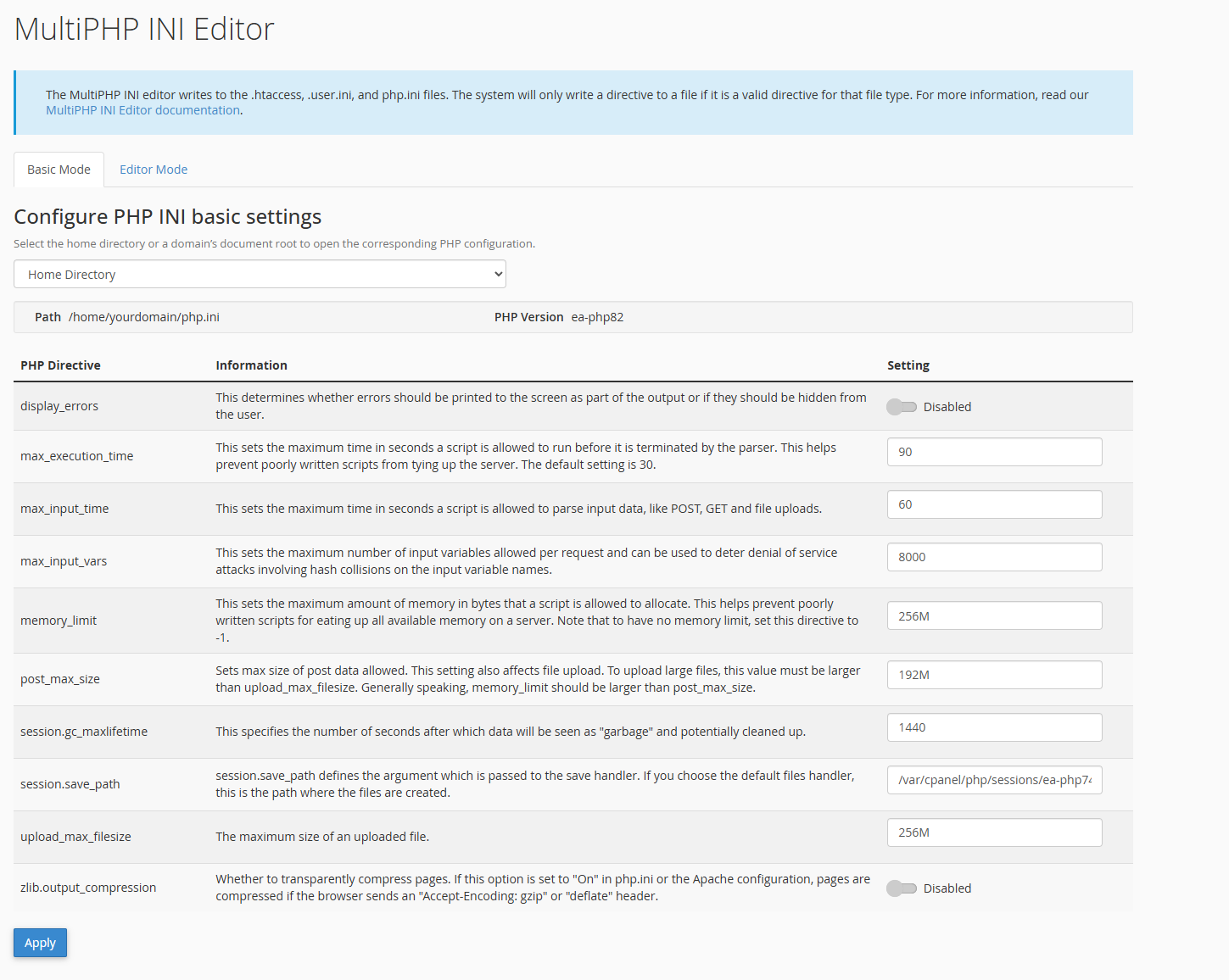
- Select your domain.
If you host multiple sites, choose the domain you want to modify from the dropdown menu at the top of the page. - Change the memory limit.
Find thememory_limitfield and change the value to256M. For sites with demanding plugins, you may need512Mor higher.

- Save your changes.
Click Apply at the bottom of the page. The new memory limit takes effect immediately on most servers. - Verify the change.
Return to Tools > Site Health > Info > Server in WordPress. The PHP memory limit should now show your new value.
If the memory limit has not changed, your hosting account may have server-level restrictions. Contact your hosting provider to request a higher limit.
Increase the memory limit via wp-config.php
If you cannot access cPanel or the MultiPHP INI Editor does not increase the limit, you can define the memory limit directly in WordPress configuration. This method overrides the default PHP setting for WordPress only.
- Connect to your site via FTP or File Manager.
Use an FTP client or cPanel’s File Manager to access your WordPress installation directory. - Locate wp-config.php.
This file is in your WordPress root directory, typicallypublic_htmlorwww. - Edit the file.
Right-click the file and select Edit. Find the line that reads/* That's all, stop editing! Happy publishing. */ - Add the memory limit definition.
Insert this line immediately before the “stop editing” comment:
define('WP_MEMORY_LIMIT', '256M');- Save and close the file.
Upload the modified file if you are using FTP. The change takes effect immediately. - Confirm the new limit.
Check Tools > Site Health > Info > Server in WordPress to verify the memory limit has increased.
This method only affects WordPress. If you need to increase the limit for other applications on your server, use the MultiPHP INI Editor method instead.
Wrapping up
You have increased the PHP memory limit for your WordPress site. This prevents memory-related errors and allows resource-intensive plugins to function correctly. Your site now has the memory allocation it needs to handle backups, caching and complex page builds.
Monitor your site over the next few days. If you still see memory errors, consider increasing the limit further or optimising your WordPress installation to reduce resource usage. Our WordPress hosting includes optimised PHP configurations and support for resource-intensive sites.
If you run into any trouble, get in touch and our team will be happy to help.


Running a WordPress site?
Get fast, secure and reliable WordPress Hosting with optimised for performance with AccelerateWP.
Get WordPress Hosting
Need multiple accounts?
Create fully isolated individual accounts for your clients and manage them all from one dashboard.
Get Reseller Hosting