Webmail lets you access your email through a browser without installing additional software. You can check messages, send replies and manage folders from any device with an internet connection.
You will log in to webmail either through your domain name or directly from cPanel’s email management area. Both methods give you immediate access to your inbox.
Before you begin
- Your domain must be pointing to your hosting account. Recently registered or transferred domains need time to propagate before webmail becomes accessible.
- An SSL certificate covering your webmail subdomain is required for HTTPS connections. Install a free Let’s Encrypt certificate if you have not done so already.
Access webmail through your domain
The fastest way to reach webmail is by typing a specific URL into your browser. This works once your domain is pointing to your hosting account and an SSL certificate is installed.
- Open your browser and enter the webmail URL.
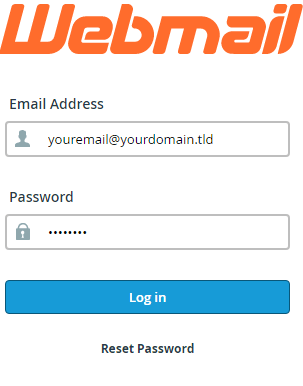
Typehttps://yourdomain.co.uk/webmailorhttps://yourdomain.co.uk:2096into the address bar, replacing yourdomain.co.uk with your actual domain name. Both URLs lead to the same login page. - Enter your email credentials.
Type your full email address in the Email field and your password in the Password field. These are the credentials you set when creating the email account. - Click Log in.
You will be taken to the webmail client selection page where you can choose between Horde and Roundcube.
If your domain is not yet pointing to your hosting account, you can use your server’s hostname instead. Replace yourdomain.co.uk with the hostname shown in your welcome email: https://hostname/webmail or https://hostname:2096. Check our guide to accessing your control panel if you need help locating your hostname.
Access webmail from cPanel
cPanel’s email management interface provides direct access to any mailbox on your account. This method bypasses the standard webmail login page and takes you straight to the inbox.
- Log in to cPanel.
Access your control panel using the credentials provided in your welcome email. - Open the Email Accounts section.
Scroll to the Email section on the cPanel home page and click Email Accounts. This displays all email addresses configured on your account.
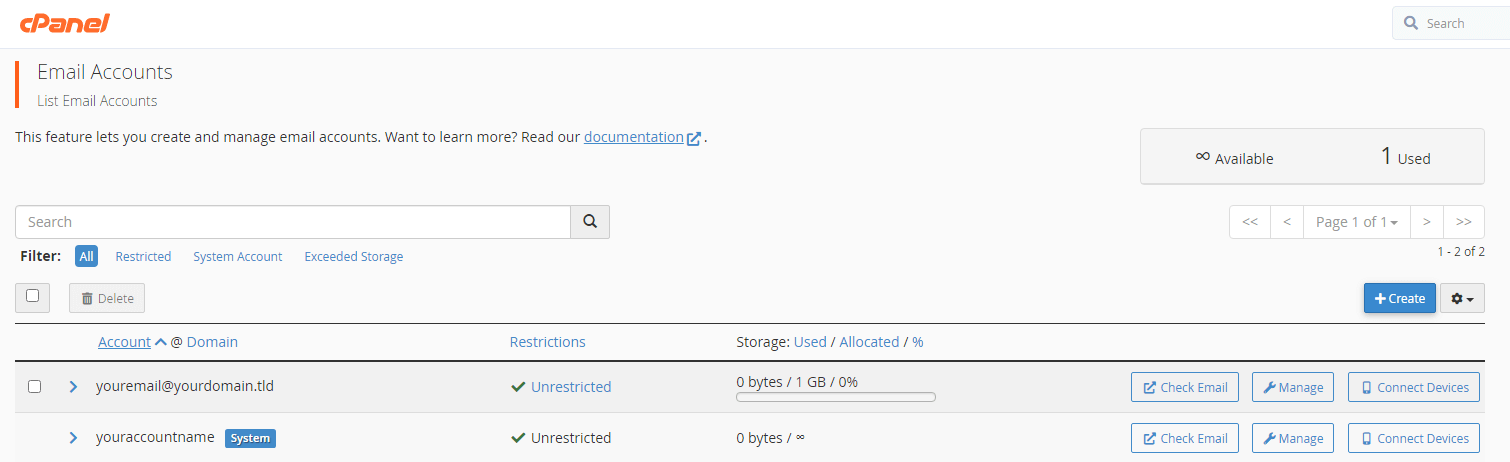
- Click Check Email next to the mailbox you want to access.
This button appears in the row for each email account. Clicking it opens the webmail client selection page for that specific mailbox. - Select your preferred webmail client.
Choose either Horde or Roundcube by clicking the corresponding button. Both clients provide full email functionality with slightly different interfaces.
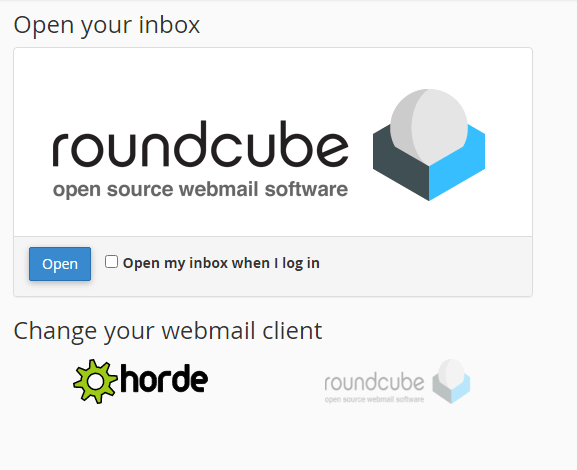
- Click Open.
Your chosen webmail client loads with the selected mailbox already logged in. You can now read messages, compose emails and manage folders.
Wrapping up
You can now access your cPanel webmail through your browser. You logged in either by entering your domain’s webmail URL or by using cPanel’s email management interface to access a specific mailbox directly.
Webmail provides convenient access from any device, but lacks some features found in desktop email clients. If you need advanced functionality like offline access or better calendar integration, consider setting up your email account in Outlook. Browse our email guides for more ways to manage your cPanel email accounts.
If you run into any trouble, get in touch and our team will be happy to help.
Did this guide solve your problem?
Still stuck?
Our UK support team answers tickets and live chat every day. Send us the guide you were following and where it stopped working.
Keep learning
Find a guide
Related guides

Email on your own domain
Every cPanel hosting plan includes mailboxes you manage yourself.
Get cPanel Hosting
Need the domain first?
Register the domain your mailboxes will sit on, with hundreds of extensions available.
Search Domains