When you switch users in Linux you can seamlessly transitions between accounts without logging out, this is useful for administrative tasks or when you need to access files with different owners. When switching users, always ensure the target user has the necessary permissions for the task.
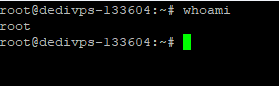
You can check your current session with the command whoami which returns what user you are currently using.
Using sudo to switch users
sudo allows you to execute commands with the privileges of another user, typically the root user, and is commonly used when you need to perform administrative tasks.
1. After that, open a terminal.
2. Now, type sudo su username to switch to the other user.
3. Finally, authenticate by entering your own password when prompted.
With this method, you do not need the target user’s password (unless you are switching to a restricted user). It’s helpful when you need temporary root access, without issuing commands directly as the root user or, if you’re working with users that need elevated privileges.
Using su to switch users
The su (substitute user) command allows you to switch users directly within your current session, requiring the password of the target user.
1. To begin, open a terminal.
2. Next, type su username to switch to the target user.
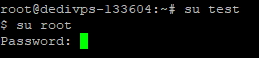
3. Then, enter the target user’s password when prompted.
This is useful when you need to test what access or permissions a specific user has. Administrators use it to diagnose issues or check for privilege escalation problems.
After switching users, you might need to check file ownership to see what files that user can access. Or change file ownership with chown if permissions need adjusting.
Using the login Command
As a bonus the login command can be used for switching users on local systems, especially in multi-tenant or multi-user environments.
1. First, open your terminal.
2. Next, type login username to log in as the other user.
3. Then, enter the target user’s password when prompted.
This method isn’t supported on our VPS platform, but it’s good to know if you’re working on local systems or multi-user environments elsewhere.
User management is just one part of server administration. Check out our guide to manage your VPS for more on keeping your server secure and organised.


Need more power?
Get scalable resources with our VPS hosting with root access and optional software.
Get VPS Hosting
Starting something new?
Perfect for websites and small businesses unlimited bandwidth with cPanel hosting.
Get cPanel Hosting