Your Plesk contact email is essential for receiving important alerts, account notifications, renewal reminders, and resource usage warnings. It’s also required for self-service password resets if you get locked out of your account. Similar to how you might update your account contact details with your hosting provider, keeping your Plesk contact email current ensures you stay informed about your server.
In this guide learn how to change contact emails in Plesk control panel.
Changing contact emails by account
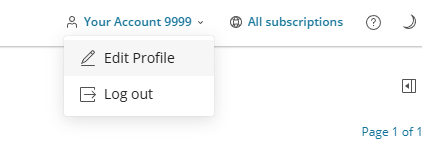
1. First login to Plesk, then navigate to your account name as shown in the screenshot below.

2. After that click on your account name to expand the drop-down menu.
3. Moving on from here, click on Edit Profile. This will take you to the account management area.
4. Now you are in the account configuration page you can make changes to either your email address or add in an external email address. We would suggest using an external email address as this provides some redundancy in case there are any issues with your mail account.
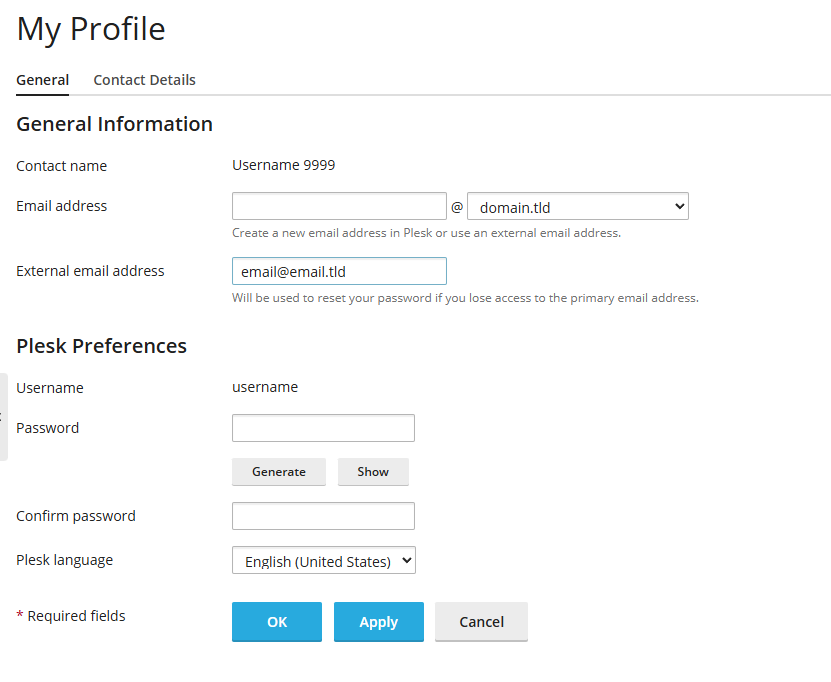
5. Click Apply to set those changes. You have now changed over your Plesk contact information.
Your Plesk contact email is now updated. You’ll receive future notifications and alerts at the new address.
Additional email management
Once you’ve updated your contact details, you may also want to:
- Set up out-of-office replies for your email accounts
- Configure email forwarding or aliases
- Adjust spam filter settings
If you’re using Plesk to manage websites, you might also find it useful to install WordPress on Plesk for easy site management. For any email configuration changes that affect mail services, you may need to restart Plesk services to apply the changes.


Ready to get started?
Launch your website with our reliable cPanel hosting with unlimited bandwidth and expert support.
Get cPanel Hosting