Outdated contact details in cPanel prevent you from receiving critical notifications about your hosting account. You miss alerts about SSL certificate failures, DNS errors and security issues that could disrupt your site. Keeping your email address current ensures you receive password reset links and can recover your account if you lose access.
You will update your primary contact email, configure notification preferences and verify your changes. This takes around five minutes and ensures you stay informed about your hosting account.
Before you begin
- You need access to your cPanel control panel. If you cannot log in, see how to access your control panel.
- We recommend using an email address on an external domain. This prevents lockouts if your hosting account experiences issues.
Access the contact information page
The contact information page in cPanel stores your primary email address and controls which notifications you receive. You need to locate this page before making any changes.
- Log in to cPanel.
Access your control panel at the URL provided in your welcome email, typicallyyourdomain.co.uk:2083. - Open the Contact Information page.
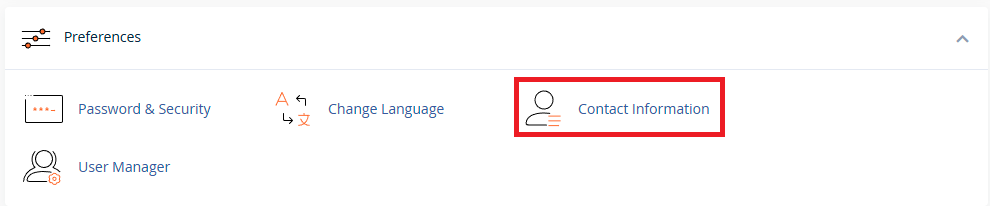
Scroll down to the Preferences section on the main cPanel page. Click Contact Information to open the settings page.
Update your email addresses
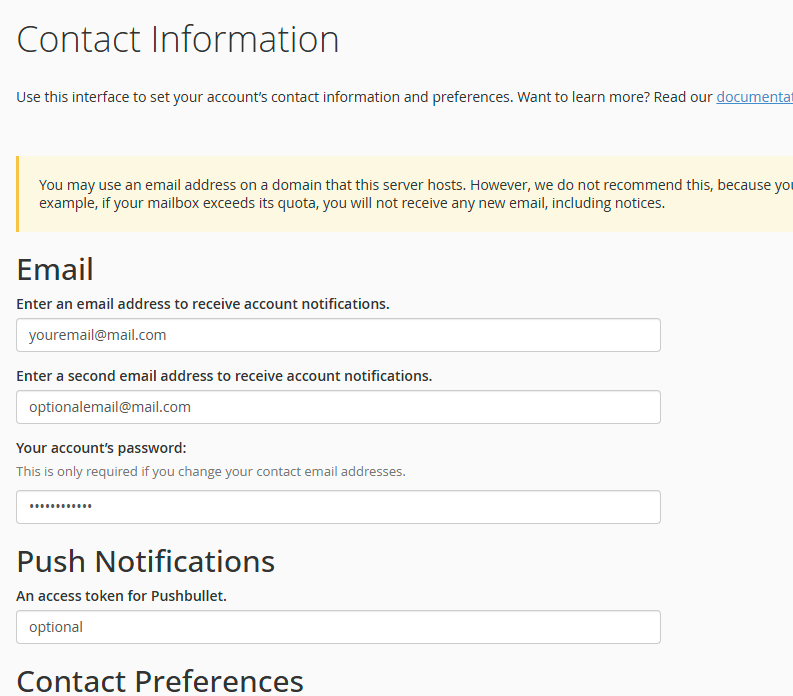
You can set a primary email address and an optional secondary address as a backup. cPanel sends all account notifications to these addresses, including password reset links and security alerts.
- Enter your new email address.
Type your preferred email address in the Primary Email field. This address receives all cPanel notifications. - Add a secondary email (optional).
Enter a backup email address in the Secondary Email field. This provides redundancy if your primary address becomes unavailable. - Enter your cPanel password.
Type your current cPanel password in the Password field. This confirms you have permission to change contact details.
Configure notification preferences
cPanel sends notifications for various events including disk space warnings, SSL certificate issues and security alerts. You can choose which notifications to receive based on your needs.
- Review available notifications.
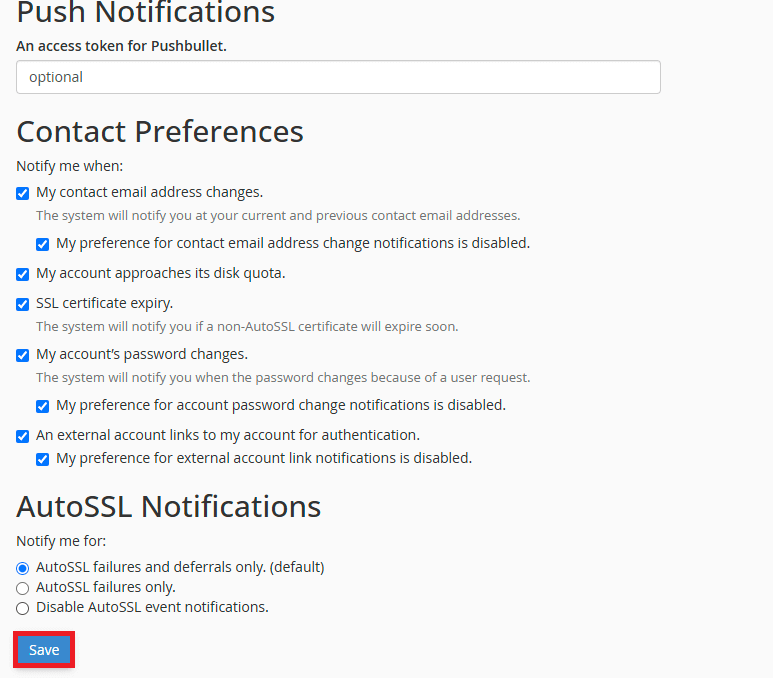
Scroll down to the Contact Preferences section. Each notification type has a checkbox that controls whether you receive alerts for that event. - Select your preferences.
Tick the boxes next to the notifications you want to receive. We recommend enabling SSL certificate alerts and disk space warnings at minimum. - Save your changes.
Click Save at the bottom of the page. cPanel confirms your contact details have been updated.
Your contact details are now current. Check your primary email inbox for a confirmation message from cPanel. If you use Plesk instead of cPanel, see how to change contact emails in Plesk.
Wrapping up
You updated your cPanel contact email and configured notification preferences. cPanel now sends alerts to your current email address, ensuring you receive password reset links and security notifications. This prevents account lockouts and keeps you informed about hosting issues.
Review your other account security settings while you are logged in. Change your cPanel password regularly and update your payment details to keep your account secure. Our cPanel hosting includes automatic backups and security monitoring.
If you run into any trouble, get in touch and our team will be happy to help.
Plans and tools mentioned in this guide
Did this guide solve your problem?
Still stuck?
Our UK support team answers tickets and live chat every day. Send us the guide you were following and where it stopped working.
Keep learning
Find a guide
Related guides

Starting from scratch?
Register a domain name and point it at your hosting in the same account.
Search Domains
Somewhere to put it
Perfect for websites and small businesses unlimited bandwidth with cPanel hosting.
Get cPanel Hosting